
 Cart is empty
Multiple Camera Systems
1. How many cameras can be viewed or recorded at the same time?
2. What is a "quad" and are there
more than one kind?
3. Can I use different types of cameras with
a single quad?
4. What does "FPS" mean and why
is it important to me?
5. Why is a processor's resolution so important?
7. If I use an alarming quad, do I need an
alarm vcr as well?
8. What is video motion detection and what
are its advantages & disadvantages?
9. What is simplex, duplex and triplex ability?
Q1: How many cameras can be viewed or recorded at the same time?
A1: Theoretically, as many as you can afford! Generally speaking, however, you can choose to view and/or record 1, 4, 8 or even 16 cameras at once- depending on the type of video processor and/ or recorder or server used. Back to top-->
Q2: What are "quads" and are there more than one kind?
A2: A video "quad" is a general term for a wide array of video processors which are capable of connecting multiple video cameras to be shown on the same screen at the same time. A "dual page" quad has eight video inputs and allows viewing of 4 cameras at a time on two "pages" or alternating screens. Anything beyond 8 cameras is generally referred to as a "multiprocessor" or multiplexer even though all are considered video processors. Our QB-4/8 and QC-4 are excellent, high resolution processors capable of viewing multiple cameras simultaneously in near real time. Read more below about frame speed and why it is so important to your selection. Back to top-->
Q3: Can I use different types of cameras with a single quad?
A3: Yes, but you may have to use adapters to connect different types of plugs into the input ports. Also, black & white quads and processors will not process color cameras- though most color processors will image black & white cameras. Generally, you can use a color camera with a monochrome-only processor. However, it will appear as black and white in quad mode and only appear onscreen as color when selected in "full frame" mode. Back to top-->
Q4: What does "FPS" mean and why is it important to me?
A4:
FPS refers to the number of "frames
per second" that can be viewed and or recorded for a
given camera.
This can be a very misleading specification when it comes to processors.
Virtually EVERY processor ever made has a 30 FPS viewing speed
when in full frame mode- so this is NOT IMPORTANT! The main spec
that really matters is how many SHARED frames per second the device
is capable of processing.
FPS speed is generally figured for a 'full screen' view of only
ONE of the 4 channels. Slower processors will show a definite
visual 'drag' as they may only be processing 7.5 fps per camera
in quad mode (or 30 fps shared divided by 4 channels). FPS goes
down as the number of cameras being viewed simultaneously goes
up. So, for 9-16 camera processors, you may have only a couple
frames per second- giving each camera a jittery time lapse appearance.
Obviously, the more frames recorded or imaged per second- the
better quality and more fluid video you'll attain. When it comes
to evidence- EVERY FRAME MAY COUNT! Back
to top-->
Q5: What is a processor's resolution and why is it so important?
A5:
Besides frame speed, the quality of any processor must also be
judged by its overall resolution capability.
Why? Because just as the speed of each camera (or video input
channel) is compressed when multiple cameras are being viewed
at once- so is the video resolution! A lower resolution quad or
processor may look sharp and fine when viewing a single channel
or camera, but can lose a LOT of quality when divided by 4 (or
especially for 8-16!). Back
to top-->
A6: An alarm quad or processor is just like a regular quad or processor with one key difference. Alarm ports connected to trigger switches allow for external devices (like pir motion sensors) to activate desired alarm response- such as showing a full screen of one of the particular cameras (or zones) for a specified period of time. Back to top-->
Q7: If I use an alarming quad, do I need an alarm vcr as well?
A7:
Not necessarily- but it is highly recommended. If you are using
a quad or processor with multiple alarm in ports- you can record
with any consumer vcr. However, you must keep vcr recording at
all times. Consumer vcrs (when used in EP mode with a T-160 video
tape) have a maximum record time of 8 hours- which means a lot
of changing tapes.
An alarm
vcr- like an alarm quad- has external trigger ports to connect
to relay switches, such as a PIR
motion sensor or the "alarm OUT" relay switch from
an alarm quad. Back
to top-->
Q8: What is video motion detection and what are its advantages & disadvantages?
A8:
First of all, there are a couple major types of "video
motion detection" available. Some are external auxiliary
sensors. Video motion detection is a relatively new technology
which is replacing external motion sensors and physical switches
for alarm recording. It is generally found in two versions- those
which use "markers" (kind of 'blips') which you place
on the screen. These little dots create an internal alarm in the
device when the video underneath them changes (figured as motion).
The other kind uses a basic light adjustment feature. The main
reported problems with the marker type are that- by the time a
subject passes the area in which marker has been installed, more
than half of the desired video will never have been recorded.
The newer light sensitive type has been reported to create a lot
of false alarms in light changing environments- such as slight
movements in the sun during outdoor surveillance. On a positive
note.
The best digital motion detection is found within true software
protocols and is now commonly referred to as PMD. A pixelated
modulation detection method which distinguishes even small movement
ANYWHERE on the screen.
The best we've seen are in our current DVR
models, which even feature adjustable sensitivity for different
conditions. These also have the ability to "mask" out
a certain area or areas. Many also feature external trigger inputs
in case you want some channels to have external dedicated switches,
such as PIR
motion sensors.
Click
here to read more about aspects of motion detection on the
special recording options and features FAQ answer page. Back
to top-->
Q9: What are simplex and duplex and triplex capabilities?
A9:
These are simply terms which define the nature of the processor.
Many 4 camera systems are simplex and usually feature two video
output ports on the back- one to go to the monitor and one to
go to a video recorder (DVR
or VCR).
The output signal from the monitor port shows all 4 cameras unless
a single camera is selected as "full frame" on the screen.
The output signal from the "VCR" or recorder port will
continously display all 4 cameras regardless of what manual functions
may be in operation by the user.
Duplexing systems essentially allow user to "loop through"
to monitor one camera while still recording the others. Duplexing
systems actually record individual camera frames rather than all
at once- allowing user to select a single camera during playback
of recording- regardless of what manual selections were made onscreen
by operator during recording.
Triplex systems are found as digital devices which allow simultaneous
monitoring, recording and playback of different events!
It does get more complicated and if you have any more questions
or feel you need a duplexing multiprocessor or quad, please let
us know and we'll be happy to help. We carry many excellent units
of this type- with 4, 8, 9 or 16 camera models to choose from.
Back
to top-->
 Help
Help Your cart
 Authentication
News
Authentication
News
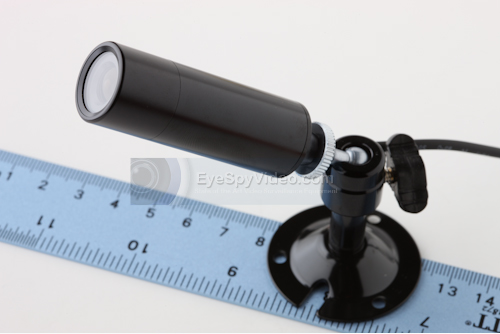
- The new CC-5XDWDR Color Weatherproof Bullet Camera has incredibly clear 700 TV lines of resolution, Digital Wide Dynamic Range and 2D Digital Noise Reduction.
- The wide dynamic range (WDR) function of a camera is intended to provide clear images even under extreme light circumstances where intensity of illumination can vary excessively, namely when there are both very bright and very dark areas simultaneously in the field of view of the camera. WDR enables the capture and display of both bright and dark areas in the same frame, in a way that there are details in both areas, i.e. bright areas are not saturated, and dark areas are not too dark. It also offers amazing low light capability.
- Digital Noise refers to the random dot pattern that is superimposed on the picture as a result of electronic noise; the 'snow' that is similar to what can be seen with poor (analog) television reception or on VHS tapes. The Digital Noise Reduction feature reduces that "noise" from the cctv camera image.
- This is the best bullet camera we have seen in terms of performance.
- If you are installing a new system or upgrading an existing one this would be the best choice. It is cutting edge so you won't have to worry about having out-dated equipment 6 months from now.
- Feel free to call us at 800-568-9291 for more information.
Previous news