
 Cart is empty
Windows Vrs Linux
BEYOND THE BELLS & WHISTLES- DON'T YOU REALLY WANT RELIABILITY & PEACE OF MIND?
There are MANY things to consider when choosing a DVR. Please be sure to do your homework!
1. What are the KEY features & advantages to an Eyespyvideo.com digital video recorder (DVR) system?
2. What are the most important elements to consider in my DVR selection?
3. What is image compression and why is it important?
4. What is the difference between a Linux based and a PC / Windows based system?
5. What is the difference between "viewable" and "record / playback" frame speeds (FPS) in the specs?
6. How is frame speed (FPS) per camera affected when multiple cameras are used?
7. What is the difference between "frames per second" and "fields per second"?
8. Do all of your cameras work with your DVRs?
9. How easy is it for someone to use one- or do you really need to be a "computer nerd"?
Q1: What are the KEY features & advantages to an Eyespyvideo.com digital video recording system?
A1: STABLE Linux or hardware logic-based embedded OS operating systems
ï Highest quality cutting-edge components designed to OVERPERFORM
ï High speed viewing, recording and playback
ï Remote viewing access via through a network
ï Massive amounts of hard drive storage
ï Time-tested by us and a wide cross-section of satisfied customers.
Back to top-->
Q2: What are the most important elements to consider in your DVR selection?
A2: Digital recording is definitely the way ALL video recording will be done in the future- and after a lot of quick growth, the selections have stabilized and the prices have come WAY down from inferior predecessors over the last couple years. However, many systems still have MAJOR potential drawbacks, which may not be clear when reading the specifications (which are often exaggerrated or wrong anyway!). Many systems have low frame speed recording & playback for each camera when recording multiple cameras.
One KEY advantage to DIGITAL is its higher resolution ability. Depending on features of individual unit, you may be able to achieve 480+ horizontal lines recording with digital recorders vs. 300 lines color (350 bw) with the highest quality analog VCR units (such as our high band/ high density models). Most analog recorders permit only 280 lines for black and white and 240 lines for color.
Please click here to SEE our new 4 to16 camera standalone NON-PC based digital recorders for very economical solutions.
Back to top-->
Q3: What is image compression and why is it important?
A3: Image compression refers to the type of method used to compress video signals. The most common forms are: motion JPEG (aka MJPEG), MPEG2, MPEG4 and WAVELET. MPEG-4 and Wavelet are the most popular in many DVR systems due to their more efficient compression taking up less space on the hard drive- especially in multiple camera operations. Back to top-->
Q4: What is the difference between a Linux-based and a PC / Windows-based system?
A4: That's a GREAT question which most don't bother to ask! In our experience, the simpler Linux OS is MUCH more stable when compared to those operating through a Windows-based computer OS. It is much less likely to "crash". System stability should be considered PARAMOUNT when recording video, especially that which may be needed later for evidence. Back to top-->
Q5: What is the difference between "viewable" and "record / playback" frame speeds (FPS) in the specs?
A5: It's not nearly as difficult for a processor to allow you to view multiple cameras in real time onscreen as it is to record and replay them. *Watch for this spec CAREFULLY as viewable speeds are often touted while the actual recording/ playback speeds are played down or not even listed at all. There are systems out there which can view 4, 8, 12 or 16 cameras at up to 30 fps per camera on all cameras, but often record / play back at MUCH lower. Here's the way the math works on this one: simply divide the maximum recording speed (*again, NOT the "viewable" or "display" speed!) of a system by the number of cameras used to determine how fast your recorded video can be played back at. So, 4 cameras @ 30fps per camera in simultaneous realtime requires a system which supports 120fps. Back to top-->
Q6: How is frame speed (FPS) per camera affected when multiple cameras are used?
A6: Basically, the total number of frames per second are divided by the number of cameras. Back to top-->
Q7: What is the difference between "frames per second" and "fields per second"?
A7: This is an easy answer- but concerns a very misunderstood concept. Each frame of video is composed of two fields- so there are 2 fields of video per send for every frame (2:1 interlace). And that's where the trouble starts. Many systems are being listed in terms of fields per second rather than frames per second. If a 4 channel system is only capable of 30 frames per second recording, this number is shared by the 4 signals - leaving you with 7.5 frames per second per camera. Video signals require A LOT of bandwith and it is difficult to impossible for even the best current technology computers to compress, record and play back 16 different video signals (and even 16 different audio signals as ours are also capable of) in actual real time. Certain processors (and we won't name names because we're notout to fight) simply won't be able to the job required- and those that actually can very quickly become overworked and overheated. The result is failure and a dead DVR system (aka a fairly large 50 lb. paperweight).
Back to top-->
Q8: Do all of your cameras work with your DVRs?
A8: YES! And so does all of our wireless equipment. Next question. Back to top-->
Q9: How easy is it for someone to use one- or do you really need to be a 'computer nerd'?
A9: You really need to be a 'supernerd' to BUILD a great DVR system- but absolutely anybody can USE OURS. It could even be considered fun to use. It's amazingly simple and user-friendly. The systems all use on-screen programming guides to select and activate features / options. *NOTE: to set up one of our DVRs for operation over a PC computer network may require additional router hardware and advanced networking knowledge. At the same time, we won't lie to you- many of these systems have some very advanced features (especially networking and pan/ tilt/ zoom functions) which are extremely complex and may be very difficult to use. Back to top-->
Page1 content
 Help
Help Your cart
 Authentication
News
Authentication
News
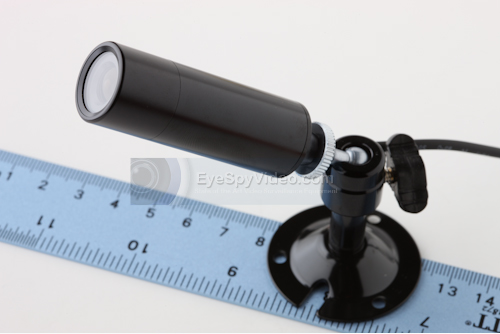
- The new CC-5XDWDR Color Weatherproof Bullet Camera has incredibly clear 700 TV lines of resolution, Digital Wide Dynamic Range and 2D Digital Noise Reduction.
- The wide dynamic range (WDR) function of a camera is intended to provide clear images even under extreme light circumstances where intensity of illumination can vary excessively, namely when there are both very bright and very dark areas simultaneously in the field of view of the camera. WDR enables the capture and display of both bright and dark areas in the same frame, in a way that there are details in both areas, i.e. bright areas are not saturated, and dark areas are not too dark. It also offers amazing low light capability.
- Digital Noise refers to the random dot pattern that is superimposed on the picture as a result of electronic noise; the 'snow' that is similar to what can be seen with poor (analog) television reception or on VHS tapes. The Digital Noise Reduction feature reduces that "noise" from the cctv camera image.
- This is the best bullet camera we have seen in terms of performance.
- If you are installing a new system or upgrading an existing one this would be the best choice. It is cutting edge so you won't have to worry about having out-dated equipment 6 months from now.
- Feel free to call us at 800-568-9291 for more information.
Previous news